

Sep 7, 2026
A side-by-side look at how Otus compares to popular free AI tools when it comes to working with sensitive student data.
 A teacher pastes a spreadsheet of quiz scores into ChatGPT on a Tuesday afternoon and gets back a tidy summary of who’s struggling. Nothing about that seems too risky. It feels like using a tool the way it was meant to be used. The chatbot wasn’t built with a district in mind, though, and the file they just uploaded didn’t stay contained the way they probably assumed it would.
So is what your teachers are already doing a problem? The answer depends on two things: what’s being uploaded, and whether anyone at the building or district level has any visibility into it at all. Many districts have neither piece figured out yet, which is less about any one teacher doing something wrong and more about oversight lagging behind the rapid spread of these tools.
This conversation needs to be had. It’s crucial that superintendents and curriculum or technology leaders determine what AI for student data analysis requires, and what separates a purpose-built platform from a general-purpose assistant with a school-shaped skin on it.
What is AI for student data analysis?
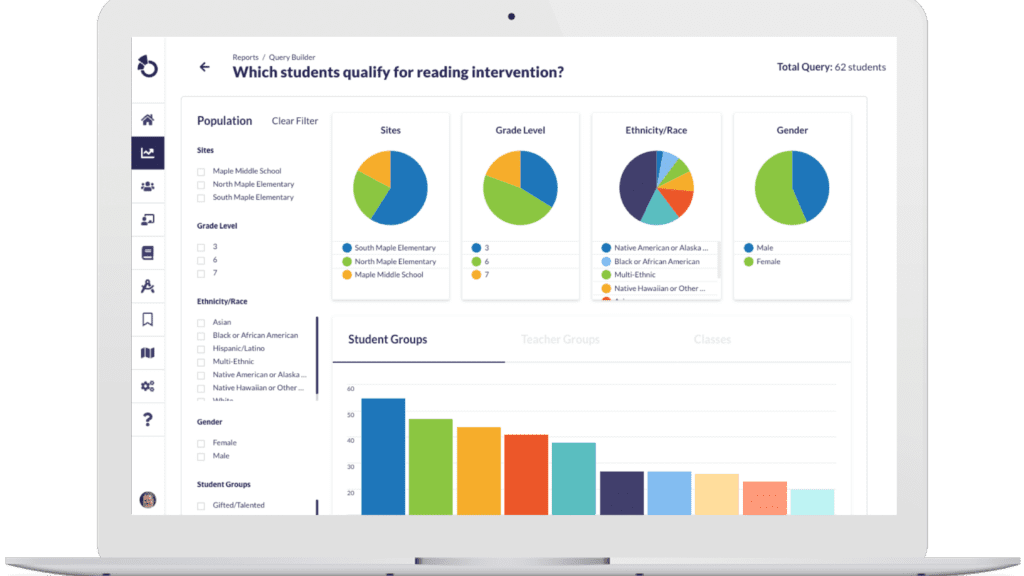
AI for K-12 student data analysis refers to tools that use artificial intelligence to interpret information about student performance, whether that’s assessment scores, standards mastery, attendance, behavior, or intervention history, and turn it into something a teacher or administrator can act on.
The category splits into two approaches. General-purpose AI assistants (tools like ChatGPT and Claude) can analyze whatever data a person feeds them, and may retain some facts from earlier conversations, but they have no built-in structured connection to a district’s student records. Purpose-built platforms are designed around a specific data environment from the ground up, so the AI already has context on a student before anyone types a question.
That distinction is key when a district is choosing a tool.
Can teachers use ChatGPT with student data?
Technically, yes, but this is where districts run into trouble without realizing it.
Student Personally Identifiable Information (PII) under FERPA not only includes names and ID numbers, but any combination of information that could reasonably identify a specific student, even indirectly. A spreadsheet with names and grades qualifies. So does a file with ID numbers and behavior notes, even without a name attached, if the reader could piece together who the data describes.
When a teacher pastes that type of file into a general-purpose AI tool, the district loses visibility into where that data went and whether it’s retained anywhere outside the conversation. It’s not that teachers are cutting corners or acting carelessly here, either. They’re simply using an available tool because nobody has given them a better alternative or told them not to use the free one.
What is a district AI governance policy, and why does it matter here?
A district AI governance policy sets clear rules for which AI tools staff can use and what kinds of student data can be entered into them. It also spells out who’s accountable if something goes wrong. Without one, individual staff members are left to make judgment calls about student privacy on their own, usually under time pressure and without training on what FERPA requires.
Skipping this step leaves a district exposed. A teacher might assume a free tool is safe because it’s popular and widely used, while the district ends up with no record of what data left its systems or where it went.
Purpose-built AI vs. general-purpose AI in education
Where does the data live? That’s the dividing line to understand before evaluating any AI tool for a district.
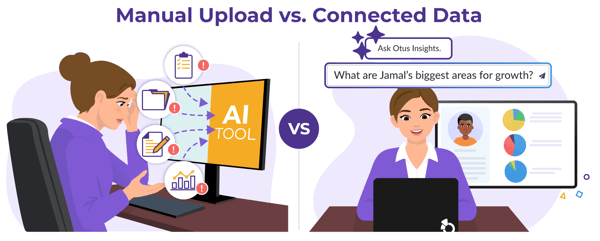
A general-purpose AI assistant might remember details from earlier conversations with a user, but it has no built-in connection to a district’s student records. If a teacher wants help interpreting a student’s progress, they first have to work out everything the assistant would need to see the full picture, then manually export and upload each piece themselves. That process leaves room for two major problems: leaving out something relevant because they didn’t think to include it, and grabbing an outdated or mismatched file somewhere along the way from one system to another.
A purpose-built AI platform works differently because the AI sits inside a system that already holds the student’s history. Assessment results across the year, standards mastery over time, MTSS documentation, behavior and attendance patterns, and more are all connected to the same student profile. The AI isn’t waiting on anyone to feed it context. It already has the context, because that’s where the data was living in the first place.
This is really a question of what kind of memory. A general-purpose tool’s memory, where it exists, holds fragments a person has typed in past conversations, not a district’s structured, governed student records. A platform built around a district’s own data has that fuller record connected from the start, governed by the same permissions and access controls the district already trusts.
For more on building dashboards, check out 5 Custom Dashboards School Leaders Can Create Using AI.
Otus AI vs. general AI assistants: A side-by-side look
|
|
General-Purpose AI Assistant |
Otus AI Insights |
|
Data grounding |
May recall details a user has shared in past conversations, but has no automatic, structured connection to a district’s student records |
Grounded in each student’s ongoing assessment, standards, and intervention history |
|
Data accuracy |
Assumes the uploaded file is clean and complete |
Connected directly to district systems with student records already matched and verified across multiple sources |
|
Admin visibility |
No district-level oversight of who’s using it or what’s entered |
Full rollout with district-level controls and permissions |
|
Primary purpose |
General efficiency tasks such as drafting, summarizing, and brainstorming |
Built around specific district workflows like common assessments, standards-based grading, and MTSS |
|
Privacy model |
Relies on individual staff judgment for what gets entered |
Governed at the district level, with data staying inside existing permissions |
|
Cost over time |
Often free initially, with pricing models that can shift later |
Transparent, predictable cost built into the platform |
The true cost of free AI tools for schools
“Free” is a big perk, and districts should take advantage of it when appropriate. But districts have been down this road before. Google Classroom launched free and became deeply embedded in daily instruction before schools found themselves navigating licensing changes and suite bundling costs down the line. Remind and ClassDojo followed a similar arc, offering a free tool that was widely adopted before eventually monetizing in ways that districts didn’t plan around.
This doesn’t mean every free AI tool will follow the same pattern, but the true cost of a free tool includes the cost of not knowing what the pricing model will look like in two years, and the cost of migrating an entire staff’s workflow if that model changes.
How should districts evaluate AI tools?
Five questions to ask before adopting any AI tool, especially at the district level:
- What data does this tool automatically have access to, and what does someone have to manually provide? A tool that requires constant manual uploads is a tool that depends entirely on staff diligence to work well.
- Who at the district can see how the tool is being used? An answer of no one points to a significant governance blind spot that should be addressed before rollout.
- What happens to the data after a conversation ends? Push for a direct, specific answer rather than a link to a general privacy policy. Ask if the vendor retains the conversation itself, whether the data is ever used to train or improve models, how long it’s stored, and whether a district can request deletion on demand. A vendor who can easily answer these has clearly thought through it.
- What does this cost in a year, and in three years? Ask the vendor to commit to something in writing. Get specific about what happens as the district scales up, adding more teachers or more schools over time, since a lot of pricing surprises show up in that scaling curve rather than in the sticker price on day one. A tool that’s free or cheap today with no stated model for future pricing is asking a district to take that risk on faith.
- Does this tool solve a problem the district hasn’t found a good process for, or does it just speed up something staff already know how to do? A tool that automatically pulls Tier 2 and Tier 3 progress monitoring data into a connected view is solving a problem most districts still handle by hand, checking multiple systems and building a summary manually every cycle. A tool that drafts a first pass of a parent email is speeding up a task a teacher already does well on their own. Both have value, but they call for different expectations and a different budget.
For a useful framework for this exact question, see For, to, and with: 3 Key Prepositions for Thinking Through AI Decisions.
What is Otus AI?
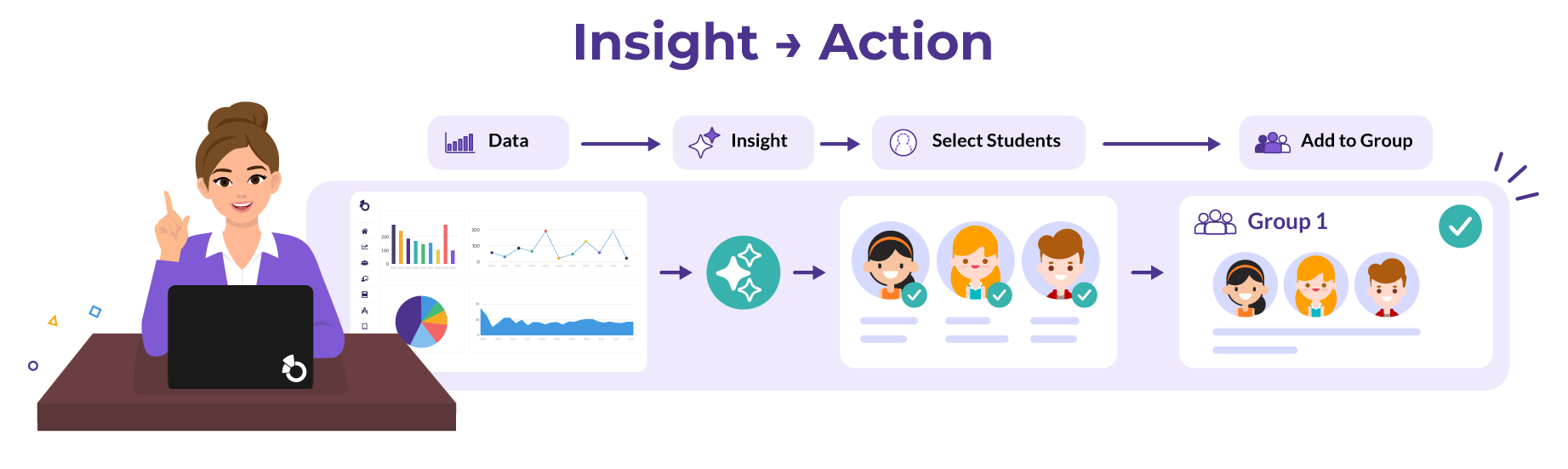
Otus AI is a layer built into the Otus platform, designed to help teachers and administrators interpret assessment data and standards mastery alongside progress monitoring, without leaving the system where that data already lives. It shows up across several parts of Otus, including assessment analytics, standards analytics, the gradebook, query reports, and third-party assessment data, so the same conversational AI experience follows a district’s data wherever it’s being reviewed.
Ask Otus AI to identify priority skills tied to standards or help prepare for a PLC meeting, and it draws on the same data already inside Otus, no manual upload required. Educators can even select students directly from an AI response and add them to a new or existing group without leaving the page, turning an insight into a next step in just a few clicks.
Otus AI is shaped directly by the educators using it. An AI Advisory Board made up of district administrators, principals, teachers, and instructional technology specialists from across the country meets regularly to weigh in on how new Otus AI features get built, a different model than a platform designed in isolation and handed to schools after the fact.
Frequently Asked Questions
Is what my teachers are already doing with AI a problem?
It depends on what’s being uploaded and whether your district has visibility into it. Most exposure traces back to a lack of policy and oversight rather than bad intent.
Is free good enough, or does a district need to spend money on AI?
Free tools are legitimately useful for general tasks like drafting and brainstorming. But for anything involving student data, a district should seriously consider a tool that has governed access to its systems, both for efficacy and security.
How do I explain the difference between free and paid AI solutions to the school board?
Frame it around what the tool already knows versus what it has to be told. A general chatbot might be highly capable, but every answer still depends on someone manually feeding it the right file at the right moment. A platform connected to a district’s own systems already has a student’s assessment and intervention history in place before anyone asks a question. The difference shows up in practice, in that answers arrive faster and the same question asked by two different team members pulls from one consistent record instead of two separately assembled ones. It also means results can roll up naturally, from a single student all the way up to an entire district, without anyone stitching reports together by hand.
What can an education AI platform do that a general chatbot can’t?
It can draw on a student’s full, connected history, assessments, standards data, MTSS documentation, and more, without anyone manually assembling that picture first. It can also operate under district-level governance rather than individual staff judgment.
Does Otus AI use student data to train models?
No. The underlying design for all Otus AI features prevents student data from being used in model training by default. That data also stays secure within Otus’ own infrastructure and is never shared with third parties.
What is Otus AI?
Otus AI is an assistant built into the Otus platform, grounded in a district’s existing student data, so teachers and administrators can get answers without leaving the system or manually compiling information. It’s available across assessment, standards, gradebook, query analytics, and more, offering instant learning insights and instructional recommendations for individual students and specific student groups.
Choosing the right AI-powered data analysis solution for your district
None of this requires a district to distrust AI or slow down its adoption, but it does mean asking more than “which AI tool is best.” Start with where the data already lives and who governs access to it, then weigh what an educator still has to do manually against what the platform already knows on its own.
Click below for a closer look at how Otus brings assessment data and standards together with progress monitoring in one controlled system.
Related Resources
Request a demo!
See exactly how Otus can help your school accelerate student growth and improve student outcomes – all while saving educators time.